Subscription & Plan Management
Review your current plan, compare tiers, and upgrade to unlock more features, branches, and employees.
What You'll Learn
- What the three Point plans include and how they differ
- How to upgrade your subscription
- How to view your billing history and plan usage stats
Before You Begin
- You need owner access to view and change subscription settings
Step 1: Go to Subscription Settings
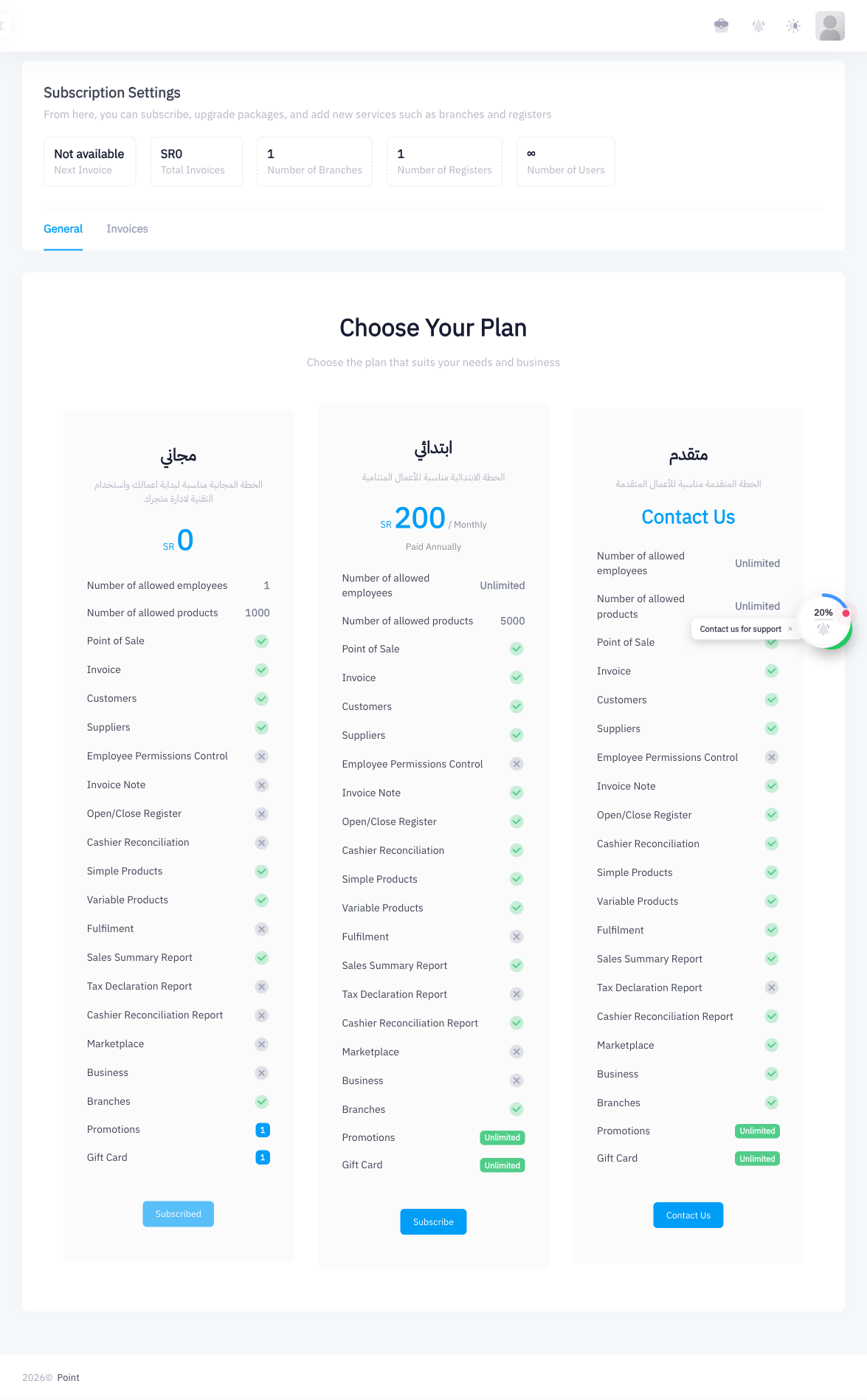
From the left sidebar, click Subscription (URL: /subscription). The Subscription page shows your current plan and usage statistics.
Step 2: View Your Current Plan
At the top of the page, your active plan is shown with a Subscribed badge. You can also see key usage statistics:
| Stat | Description |
|---|---|
| Next Invoice | Date of your next billing charge |
| Total Invoices | Total invoices processed on your account |
| Number of Branches | How many branches are active on your account |
| Number of Registers | How many registers are active |
| Number of Users | How many employee accounts exist |
Step 3: Review the Plan Comparison Table
Scroll down to see a side-by-side comparison of all three plans:
| Feature | Free | Starter (ابتدائي) | Advanced (متقدم) |
|---|---|---|---|
| Price | SAR 0 | SAR 200/month (annual) | Contact sales |
| Employees | 1 | Unlimited | Unlimited |
| Products | 1,000 | Unlimited | Unlimited |
| Custom Permission Groups | No | Yes | Yes |
| Tax Declaration Report | No | Yes | Yes |
| Promotions | 1 | Unlimited | Unlimited |
| Gift Cards | 1 | Unlimited | Unlimited |
| ZATCA Phase 2 | No | No | Yes |
| Register Reconciliation | No | No | Yes |
| Marketplace Apps | No | No | Yes |
Step 4: Click Subscribe to Upgrade
To upgrade to the Starter plan, click the Subscribe button on the Starter tier card. You will be taken through the payment flow to complete the subscription.
For the Advanced plan, click Contact Us to reach the Point sales team.
Step 5: Complete Payment
Follow the on-screen payment steps. Point accepts standard payment methods. Once payment is confirmed, your plan upgrades immediately and new features become available.
Step 6: Adding Branches and Registers
After upgrading, you can add branches and registers as your business grows:
- Go to Settings > Branches and Registers
- Click Add Branch to create a new location
- Within a branch, click Add Register to add a new register
Each branch and register added may affect your subscription billing depending on your plan.
Summary
Point offers three tiers: Free (1 employee, 1,000 products), Starter at SAR 200/month annually (unlimited employees and products, custom roles, tax report, unlimited promotions and gift cards), and Advanced (ZATCA Phase 2, register reconciliation, marketplace apps). Upgrade from the Subscription page at any time. The plan takes effect immediately after payment. Branches and registers are managed in Settings > Branches and Registers.